<?xml version="1.0" encoding="utf-8"?><feed xmlns="http://www.w3.org/2005/Atom" ><generator uri="https://jekyllrb.com/" version="4.3.4">Jekyll</generator><link href="https://www.orchide.dev/feed.xml" rel="self" type="application/atom+xml" /><link href="https://www.orchide.dev/" rel="alternate" type="text/html" /><updated>2026-02-15T07:33:01+01:00</updated><id>https://www.orchide.dev/feed.xml</id><title type="html">OrchidE</title><subtitle>The IntelliJ plugin for Ansible.
</subtitle><entry xml:lang="de"><title type="html">OrchidE Version 2025.1.1 brings improved documentation for ‘return values’ and initial support for full qualified role names.</title><link href="https://www.orchide.dev/pages/2026/02/10/orchide-2025-1-1" rel="alternate" type="text/html" title="OrchidE Version 2025.1.1 brings improved documentation for ‘return values’ and initial support for full qualified role names." /><published>2026-02-09T00:00:00+01:00</published><updated>2026-02-09T00:00:00+01:00</updated><id>https://www.orchide.dev/pages/2026/02/10/orchide-new-version-20251.1-en</id><content type="html" xml:base="https://www.orchide.dev/pages/2026/02/10/orchide-2025-1-1"><![CDATA[<h1 id="orchide-202511">OrchidE 2025.1.1</h1>

<p>OrchidE 2025.1.1 adds</p>

<ul class="unstyle dash">
  <li>partial support for <em>full qualified role names</em> and Ansible Playbook projects, and</li>
  <li>improved <em>quick documentation</em> for <em>return values</em>.</li>
</ul>

<p><br /></p>

<p><strong>Support for <em>full qualified role names</em></strong></p>

<p>Based on the <a href="https://docs.ansible.com/projects/creator/installing/#generated-ansible-playbook-project-structure" target="_blank">playbook project structure proposed by Ansible Creator</a>, 
this version provides initial support, for</p>

<ul class="unstyle dash">
  <li>code completion in playbooks for FQRN,</li>
  <li>navigation in playbooks for FQRN,</li>
  <li>correct recognition of the <em>ansible_collections</em> path as a folder for roles, and</li>
  <li>for the role annotation in inventory files (code completion of the annotation, navigation to the role, 
code completion of the role variables, navigation to the role variables in argument_specs)</li>
</ul>

<p class="col-md-offset-1 width-90"><img src="/assets/orchide/news/orchide_editor_full_qualified_role_names.webp" alt="Full qualified role name functions" loading="lazy" /></p>

<p><br /></p>

<p class="wowpanel" style="border-left:7px solid #f06060;">Currently, <strong>the following features are not supported for FQRN:</strong> <br />
    - Ansible Structure View  <br />
    - Custom OrchidE ‘New File’ actions  <br /> 
    - Detection of non-Ansible YAML files (can be configured via Ansible Folder Mapping)</p>

<p><br /></p>

<p><strong>Improved quick documentation for return values</strong></p>

<p>The quick documentation has been expanded and now also displays information about sub options of return values.</p>

<video autoplay="" loop="" muted="" playsinline="" class="col-md-offset-1 col-md-11">
    <source src="/assets/orchide/news/orchide_editor_return_value_quick_doc.webm" type="video/webm" />
</video>

<p><br /></p>

<p><strong>Changes</strong></p>

<ul class="unstyle arrowlist">
  <li>New quick documentation for return value sub-options.</li>
  <li>Basic new support for fully qualified role names (based on Ansible creator’s playbook project structure).</li>
  <li>New annotation showing an error when using Jinja2 template conditions (when, failed_when, etc.).</li>
  <li><em>Change</em>: Quick documentation is now available for Jinja2 variables in the argument specifications or comments of the role defaults/vars variables.</li>
  <li><em>Change</em>: Quick documentation is now available in the roles section of playbooks for vars keyword entries, using the description from argument specs.</li>
  <li><em>Change</em>: Quick documentation is now available for Jinja2 variables referencing the register keyword of a module.</li>
  <li><em>Change</em>: The quick documentation for keywords now includes information on the type and what it applies to.</li>
  <li><em>Bugfix</em>: A parser error occurs when a collection uses an Ansible keyword as the name of its task.</li>
  <li><em>Bugfix</em>: Various improvements have been made to the “Create Variable” quick fix when using undefined variables.</li>
  <li><em>Bugfix</em>: Exception when using a Jinja2 template in conditions (when, failed_when, etc.).</li>
  <li><em>Bugfix</em>: The Ansible structure project view doesn’t show folder names starting with a dot.</li>
  <li><em>Bugfix</em>: If a key uses the <em>flow style</em> to define values, the Jinja curly braces will not be quoted during code completion.</li>
  <li><em>Bugfix</em>: The include_tasks task would show an ‘unresolved include file’ error when Ansible-supported fact variables were used to resolve the default values.</li>
  <li><em>Bugfix</em>: Top-level group variable files are not detected in the structure view.</li>
  <li><em>Bugfix</em>: An exception occurs when trying to create a file with the ‘Ansible file’ action that already exists.</li>
  <li><em>Bugfix</em>: NullPointerException when copying and pasting from a Jupyter playbook.</li>
  <li><em><strong>Removed</strong></em>: Deprecated setting: File Type Patterns.</li>
</ul>

<p><br /></p>

<p><strong>Deprecation</strong></p>

<ul class="wowpanel" style="border-left:7px solid #f06060;">
  <li>Support for IntelliJ platform 2024.1 is <em>deprecated</em> and will end with the launch of the EAP for IntelliJ version 2026.1.</li>
  <li>Support for the OrchidE builder format V1 is <em>deprecated</em>.</li>
</ul>]]></content><author><name></name></author><category term="orchide" /><summary type="html"><![CDATA[OrchidE 2025.1.1 OrchidE 2025.1.1 adds partial support for full qualified role names and Ansible Playbook projects, and improved quick documentation for return values. Support for full qualified role names Based on the playbook project structure proposed by Ansible Creator, this version provides initial support, for code completion in playbooks for FQRN, navigation in playbooks for FQRN, correct recognition of the ansible_collections path as a folder for roles, and for the role annotation in inventory files (code completion of the annotation, navigation to the role, code completion of the role variables, navigation to the role variables in argument_specs) Currently, the following features are not supported for FQRN: - Ansible Structure View - Custom OrchidE ‘New File’ actions - Detection of non-Ansible YAML files (can be configured via Ansible Folder Mapping) Improved quick documentation for return values The quick documentation has been expanded and now also displays information about sub options of return values. Changes New quick documentation for return value sub-options. Basic new support for fully qualified role names (based on Ansible creator’s playbook project structure). New annotation showing an error when using Jinja2 template conditions (when, failed_when, etc.). Change: Quick documentation is now available for Jinja2 variables in the argument specifications or comments of the role defaults/vars variables. Change: Quick documentation is now available in the roles section of playbooks for vars keyword entries, using the description from argument specs. Change: Quick documentation is now available for Jinja2 variables referencing the register keyword of a module. Change: The quick documentation for keywords now includes information on the type and what it applies to. Bugfix: A parser error occurs when a collection uses an Ansible keyword as the name of its task. Bugfix: Various improvements have been made to the “Create Variable” quick fix when using undefined variables. Bugfix: Exception when using a Jinja2 template in conditions (when, failed_when, etc.). Bugfix: The Ansible structure project view doesn’t show folder names starting with a dot. Bugfix: If a key uses the flow style to define values, the Jinja curly braces will not be quoted during code completion. Bugfix: The include_tasks task would show an ‘unresolved include file’ error when Ansible-supported fact variables were used to resolve the default values. Bugfix: Top-level group variable files are not detected in the structure view. Bugfix: An exception occurs when trying to create a file with the ‘Ansible file’ action that already exists. Bugfix: NullPointerException when copying and pasting from a Jupyter playbook. Removed: Deprecated setting: File Type Patterns. Deprecation Support for IntelliJ platform 2024.1 is deprecated and will end with the launch of the EAP for IntelliJ version 2026.1. Support for the OrchidE builder format V1 is deprecated.]]></summary></entry><entry xml:lang="en"><title type="html">OrchidE version 2025.1.0 brings improvements in roles, new inspections and bug fixes.</title><link href="https://www.orchide.dev/pages/2025/11/22/orchide-2025-1-0" rel="alternate" type="text/html" title="OrchidE version 2025.1.0 brings improvements in roles, new inspections and bug fixes." /><published>2025-11-22T00:00:00+01:00</published><updated>2025-11-22T00:00:00+01:00</updated><id>https://www.orchide.dev/pages/2025/11/22/orchide-new-version-20251.0-en</id><content type="html" xml:base="https://www.orchide.dev/pages/2025/11/22/orchide-2025-1-0"><![CDATA[<h1 id="orchide-202510">OrchidE 2025.1.0</h1>

<p>OrchidE 2025.1.0 brings contextual <em>code completion</em> in roles, various new <em>“Go to Declaration”</em> functions for the inventory and two new <em>inspections</em>.</p>

<p><br /></p>

<p><strong>Context-related code completion in roles</strong></p>

<p>In roles, only variables are used for code completion, inlay display and the <em>inspection “Undefined Variables”</em> that</p>

<ul class="unstyle dash">
  <li>are defined in the same role, and</li>
  <li>from the inventory when the role is referenced in the playbook <em>hosts</em> entry.</li>
</ul>

<p><br /></p>

<p>In the settings the previous behavior can be configured if necessary (Settings ➞ Editor ➞ OrchidE). 
This is recommended, for example, if variables from other roles are used.</p>

<p class="col-md-offset-1"><img src="/assets/orchide/news/orchide_editor_role_context_for_search.webp" alt="Configuration to switch off context-related code completion in roles" loading="lazy" /></p>

<p><strong>Note:</strong> Role dependencies, defined in the meta file, are not supported by OrchidE.
<br />
<br /></p>

<p id="doc-goto-id"><strong>New Go to Declarations</strong></p>

<p>The annotations <code><span>@role::</span></code> and <code><span>@alias::</span></code> in inventory files now support the “Go to Declaration” action.</p>

<p>Using “Go to Declaration” on <code><span>@role::</span></code> navigates to the corresponding tasks/main.yml file of the role.
Using “Go to Declaration” on <code><span>@alias::</span></code> navigates to the corresponding meta/argument_specs.yml file.</p>

<p class="col-md-offset-1"><img src="/assets/orchide/news/orchide_navigation_goto_by_alias.gif" alt="Goto declaration of role and alias annotation" loading="lazy" /></p>

<p><br /></p>

<p>In inventory files, you can now navigate between the inventory group entries and to the group variables.</p>

<p class="col-md-offset-1"><img src="/assets/orchide/news/orchide_navigation_in_inventory.gif" alt="Navigation in inventory files" loading="lazy" /></p>

<p><br /></p>

<p id="doc-inspections-id"><strong>New Inspections</strong></p>

<p>The <em>inspection</em> “Wrong usage of ‘item’” warns against the use of ‘item’ in <em>loop</em> if <em>‘loop_var’</em> is specified.</p>

<p class="col-md-offset-1"><img src="/assets/orchide/news/orchide_inspection_wrong_usage_of_item.webp" alt="Inspection wrong usage of item" loading="lazy" /></p>

<p><br /></p>

<p>The <em>inspection</em> “Missing quote before Jinja template” checks whether Jinja templates <code><span>&#123;{</span></code> are quoted after a key or the start of a list.</p>

<p class="col-md-offset-1"><img src="/assets/orchide/news/orchide_inspection_missing_quotes.webp" alt="Inspection missing quote before jinja" loading="lazy" /></p>

<p><br /></p>

<p><strong>Changes</strong></p>

<ul class="unstyle arrowlist">
  <li>New code completion for alias annotation within inventory variable files.</li>
  <li>Code completion for role annotation within inventory variable files is now also available at the start of the line.</li>
  <li><em>Bugfix</em>: Ansible module documentation could not be read if the description was available as a map (SAP collection).</li>
  <li><em>Bugfix</em>: Files in the inventory folder host_vars are not recognized as inventory files.</li>
  <li><em>Bugfix</em>: When opening Shell Jinja2 Ansible templates with the BashSupport Pro plugin, IntelliJ may freeze when saving.</li>
</ul>

<p><br /></p>

<p><strong>Deprecation</strong></p>

<ul class="wowpanel" style="border-left:7px solid #f06060;">
  <li>Support for IntelliJ platform 2024.1 is <em>deprecated</em> and will end with the launch of the EAP for IntelliJ version 2026.1.</li>
  <li>Support for the OrchidE builder format V1 is <em>deprecated</em>.</li>
</ul>]]></content><author><name></name></author><category term="orchide" /><summary type="html"><![CDATA[OrchidE 2025.1.0 OrchidE 2025.1.0 brings contextual code completion in roles, various new “Go to Declaration” functions for the inventory and two new inspections. Context-related code completion in roles In roles, only variables are used for code completion, inlay display and the inspection “Undefined Variables” that are defined in the same role, and from the inventory when the role is referenced in the playbook hosts entry. In the settings the previous behavior can be configured if necessary (Settings ➞ Editor ➞ OrchidE). This is recommended, for example, if variables from other roles are used. Note: Role dependencies, defined in the meta file, are not supported by OrchidE. New Go to Declarations The annotations @role:: and @alias:: in inventory files now support the “Go to Declaration” action. Using “Go to Declaration” on @role:: navigates to the corresponding tasks/main.yml file of the role. Using “Go to Declaration” on @alias:: navigates to the corresponding meta/argument_specs.yml file. In inventory files, you can now navigate between the inventory group entries and to the group variables. New Inspections The inspection “Wrong usage of ‘item’” warns against the use of ‘item’ in loop if ‘loop_var’ is specified. The inspection “Missing quote before Jinja template” checks whether Jinja templates &#123;{ are quoted after a key or the start of a list. Changes New code completion for alias annotation within inventory variable files. Code completion for role annotation within inventory variable files is now also available at the start of the line. Bugfix: Ansible module documentation could not be read if the description was available as a map (SAP collection). Bugfix: Files in the inventory folder host_vars are not recognized as inventory files. Bugfix: When opening Shell Jinja2 Ansible templates with the BashSupport Pro plugin, IntelliJ may freeze when saving. Deprecation Support for IntelliJ platform 2024.1 is deprecated and will end with the launch of the EAP for IntelliJ version 2026.1. Support for the OrchidE builder format V1 is deprecated.]]></summary></entry><entry xml:lang="en"><title type="html">OrchidE version 2024.1.6 comes with an improved inspection ‘Missing File’.</title><link href="https://www.orchide.dev/pages/2025/09/22/orchide-2024-1-6" rel="alternate" type="text/html" title="OrchidE version 2024.1.6 comes with an improved inspection ‘Missing File’." /><published>2025-09-22T00:00:00+02:00</published><updated>2025-09-22T00:00:00+02:00</updated><id>https://www.orchide.dev/pages/2025/09/22/orchide-new-version-20241.6-en</id><content type="html" xml:base="https://www.orchide.dev/pages/2025/09/22/orchide-2024-1-6"><![CDATA[<h1 id="orchide-202416">OrchidE 2024.1.6</h1>

<p>OrchidE 2024.1.6 brings an improved <em>Inspection ‘Missing File’</em>.</p>

<p>In the copy and template task, missing files are now better recognized in the src attribute when a loop is used.
Both the loop keyword with loop_control/loop_var and with_items with the placeholder item are supported.</p>

<p>Jinja templates in the file name are resolved as long as they are simple references to variables.</p>

<p class="col-md-offset-1"><img src="/assets/orchide/news/orchide_editor_missing_include_file.gif" alt="Inspection Missing include file with loop control variable" loading="lazy" /></p>

<p><br /></p>

<p><strong>Changes</strong></p>

<ul class="unstyle arrowlist">
  <li><em>New</em>: Support for IntelliJ platform 2025.3 EAP.</li>
  <li><em>Change</em>: Improved resolving of Jinja templates used in loop variable ‘item’.</li>
  <li><em>Change</em>: Improved code completion in inventory files if an ‘alias annotation’ exists.</li>
  <li><em>Bugfix</em>: Clear caches of inspection ‘Undefined Variable’ immediately when the variable name is renamed.</li>
  <li><em>Bugfix</em>: When using the enter key for code completion of argument_spec variables, and the variable has a description, the indentation is incorrect.</li>
</ul>

<p><br /></p>

<p><strong>Deprecation</strong></p>

<ul class="wowpanel" style="border-left:7px solid #f06060;">
  <li>Support for IntelliJ platform 2023.3 is <em>deprecated</em> and will end with the launch of the EAP for IntelliJ version 2025.3.</li>
  <li>Support for the OrchidE builder format V1 is <em>deprecated</em>.</li>
</ul>]]></content><author><name></name></author><category term="orchide" /><summary type="html"><![CDATA[OrchidE 2024.1.6 OrchidE 2024.1.6 brings an improved Inspection ‘Missing File’. In the copy and template task, missing files are now better recognized in the src attribute when a loop is used. Both the loop keyword with loop_control/loop_var and with_items with the placeholder item are supported. Jinja templates in the file name are resolved as long as they are simple references to variables. Changes New: Support for IntelliJ platform 2025.3 EAP. Change: Improved resolving of Jinja templates used in loop variable ‘item’. Change: Improved code completion in inventory files if an ‘alias annotation’ exists. Bugfix: Clear caches of inspection ‘Undefined Variable’ immediately when the variable name is renamed. Bugfix: When using the enter key for code completion of argument_spec variables, and the variable has a description, the indentation is incorrect. Deprecation Support for IntelliJ platform 2023.3 is deprecated and will end with the launch of the EAP for IntelliJ version 2025.3. Support for the OrchidE builder format V1 is deprecated.]]></summary></entry><entry xml:lang="en"><title type="html">OrchidE Version 2024.1.5 includes code completion for meta files, enhanced support for copy tasks and more changes and fixes.</title><link href="https://www.orchide.dev/pages/2025/08/04/orchide-2024-1-5" rel="alternate" type="text/html" title="OrchidE Version 2024.1.5 includes code completion for meta files, enhanced support for copy tasks and more changes and fixes." /><published>2025-08-04T00:00:00+02:00</published><updated>2025-08-04T00:00:00+02:00</updated><id>https://www.orchide.dev/pages/2025/08/04/orchide-new-version-20241.5-en</id><content type="html" xml:base="https://www.orchide.dev/pages/2025/08/04/orchide-2024-1-5"><![CDATA[<h1 id="orchide-202415">OrchidE 2024.1.5</h1>

<p>OrchidE 2024.1.5 brings better support for the meta files ‘main’ and ‘argument_specs’, extended support for the src attribute of the copy task and various changes and bug fixes.</p>

<p><strong>Meta/Argument_specs-Files</strong></p>

<p>OrchidE now supports code completion and quick documentation for the <em>meta</em> and <em>argument_specs</em> files of an Ansible role and checks the syntax against the JSON schema.
This function requires a current definition package of the OrchidE Builder, which contains extended JSON schema files (from Ansible 11.5 and 20250703).</p>

<p>Alternatively, IntelliJ’s built-in function for JSON schema can be used.</p>

<p>Differences between JSON schema of OrchidE Builder and IntelliJ:</p>

<ul class="unstyle dash">
  <li>OrchidE automatically finds JSON schemas from the OrchidE Builder package. In IntelliJ, the schema must be configured manually for the meta files.</li>
  <li>Schemas from the OrchidE Builder package contain more detailed descriptions of the attributes.</li>
  <li>Newer schemas are available earlier with IntelliJ.</li>
  <li>With schemas from the OrchidE Builder package, some quick fixes are not available as long as OrchidE supports older IntelliJ versions. (&lt;= IntelliJ version 2024.1)</li>
</ul>

<p class="col-md-offset-1"><img src="/assets/orchide/news/orchide_editor_argument_specs_code_completion.webp" alt="Code Completion within the Ansible's argument_specs file" loading="lazy" /></p>

<p><br /></p>

<p><strong>Copy Task</strong></p>

<p>OrchidE now supports code completion and verification for the ‘src’ attribute of the copy task identically to the template task.
You can also navigate to the source file (go to declaration, <kbd>Ctrl</kbd> + <kbd>B</kbd>, <kbd>&#8984;</kbd> + <kbd>B</kbd>)</p>

<p class="col-md-offset-1"><img src="/assets/orchide/news/orchide_editor_src_attribute_copy_task.webp" alt="Code completion for the src attribute of the copy task" loading="lazy" /></p>

<p><strong>Changes</strong></p>

<ul class="unstyle arrowlist">
  <li><em>New</em>: New quick fix for module arguments with the wrong type.</li>
  <li><em>New</em>: The quick documentation section “See Also” now supports external links.</li>
  <li><em>New</em>: Support for code completion of variables defined by the vars keyword in the ‘include_tasks’ and ‘import_tasks’ tasks.</li>
  <li><em>Change</em>: Jinja closing braces will now be added after typing second ‘{‘ immediately.</li>
  <li><em>Change</em>: Jinja closing braces will now be added in Jinja templates files.</li>
  <li><em>Bugfix</em>: Quick Documentation generates an error if no description is available for type.</li>
  <li><em>Bugfix</em>: Action new Ansible file don’t use file extension from editor settings.</li>
</ul>

<p><br /></p>

<p><strong>Deprecation</strong></p>

<ul class="wowpanel" style="border-left:7px solid #f06060;">
  <li>Support for IntelliJ platform 2023.3 is <em>deprecated</em> and will end with the launch of the EAP for IntelliJ version 2025.3.</li>
  <li>Support for the OrchidE builder format V1 is <em>deprecated</em>.</li>
</ul>]]></content><author><name></name></author><category term="orchide" /><summary type="html"><![CDATA[OrchidE 2024.1.5 OrchidE 2024.1.5 brings better support for the meta files ‘main’ and ‘argument_specs’, extended support for the src attribute of the copy task and various changes and bug fixes. Meta/Argument_specs-Files OrchidE now supports code completion and quick documentation for the meta and argument_specs files of an Ansible role and checks the syntax against the JSON schema. This function requires a current definition package of the OrchidE Builder, which contains extended JSON schema files (from Ansible 11.5 and 20250703). Alternatively, IntelliJ’s built-in function for JSON schema can be used. Differences between JSON schema of OrchidE Builder and IntelliJ: OrchidE automatically finds JSON schemas from the OrchidE Builder package. In IntelliJ, the schema must be configured manually for the meta files. Schemas from the OrchidE Builder package contain more detailed descriptions of the attributes. Newer schemas are available earlier with IntelliJ. With schemas from the OrchidE Builder package, some quick fixes are not available as long as OrchidE supports older IntelliJ versions. (&lt;= IntelliJ version 2024.1) Copy Task OrchidE now supports code completion and verification for the ‘src’ attribute of the copy task identically to the template task. You can also navigate to the source file (go to declaration, Ctrl + B, &#8984; + B) Changes New: New quick fix for module arguments with the wrong type. New: The quick documentation section “See Also” now supports external links. New: Support for code completion of variables defined by the vars keyword in the ‘include_tasks’ and ‘import_tasks’ tasks. Change: Jinja closing braces will now be added after typing second ‘{‘ immediately. Change: Jinja closing braces will now be added in Jinja templates files. Bugfix: Quick Documentation generates an error if no description is available for type. Bugfix: Action new Ansible file don’t use file extension from editor settings. Deprecation Support for IntelliJ platform 2023.3 is deprecated and will end with the launch of the EAP for IntelliJ version 2025.3. Support for the OrchidE builder format V1 is deprecated.]]></summary></entry><entry xml:lang="de"><title type="html">OrchidE Version 2024.1.4: Bug fixes and support for Intellij version EAP 2025.2.</title><link href="https://www.orchide.dev/pages/2025/05/19/orchide-2024-1-4" rel="alternate" type="text/html" title="OrchidE Version 2024.1.4: Bug fixes and support for Intellij version EAP 2025.2." /><published>2025-05-18T00:00:00+02:00</published><updated>2025-05-18T00:00:00+02:00</updated><id>https://www.orchide.dev/pages/2025/05/19/orchide-new-version-20241.4-en</id><content type="html" xml:base="https://www.orchide.dev/pages/2025/05/19/orchide-2024-1-4"><![CDATA[<h1 id="orchide-202414">OrchidE 2024.1.4</h1>

<p>OrchidE 2024.1.4 brings minor bug fixes and support for IntelliJ platform EAP version 2025.2.</p>

<p><strong>Changes</strong></p>

<ul class="unstyle arrowlist">
  <li><em>Bugfix</em>: Recognition of playbooks in root folders of roles.</li>
  <li><em>Bugfix</em>: Exception occurred when a file or folder was deleted from within the Ansible structure project view.</li>
  <li><em>Bugfix</em>: Exception when loading a collection with tasks for which no description is available (i.e. oracle.oci) from an OrchidE builder package V2.</li>
  <li><em>Bugfix</em>: Minor fixes to error handling.</li>
</ul>

<p><br /></p>

<p><strong>Deprecation</strong></p>

<ul class="wowpanel" style="border-left:7px solid #f06060;">
  <li>Support for IntelliJ platform 2023.3 is <em>deprecated</em> and will end with the launch of the EAP for IntelliJ version 2025.3.</li>
  <li>Support for the OrchidE builder format V1 is <em>deprecated</em>.</li>
</ul>]]></content><author><name></name></author><category term="orchide" /><summary type="html"><![CDATA[OrchidE 2024.1.4 OrchidE 2024.1.4 brings minor bug fixes and support for IntelliJ platform EAP version 2025.2. Changes Bugfix: Recognition of playbooks in root folders of roles. Bugfix: Exception occurred when a file or folder was deleted from within the Ansible structure project view. Bugfix: Exception when loading a collection with tasks for which no description is available (i.e. oracle.oci) from an OrchidE builder package V2. Bugfix: Minor fixes to error handling. Deprecation Support for IntelliJ platform 2023.3 is deprecated and will end with the launch of the EAP for IntelliJ version 2025.3. Support for the OrchidE builder format V1 is deprecated.]]></summary></entry><entry xml:lang="en"><title type="html">OrchidE Version 2024.1.3: Introducing OrchidE Builder format V2.</title><link href="https://www.orchide.dev/pages/2025/04/22/orchide-2024-1-3" rel="alternate" type="text/html" title="OrchidE Version 2024.1.3: Introducing OrchidE Builder format V2." /><published>2025-04-20T00:00:00+02:00</published><updated>2025-04-20T00:00:00+02:00</updated><id>https://www.orchide.dev/pages/2025/04/22/orchide-new-version-20241.3-en</id><content type="html" xml:base="https://www.orchide.dev/pages/2025/04/22/orchide-2024-1-3"><![CDATA[<h1 id="orchide-202413">OrchidE 2024.1.3</h1>

<p>OrchidE 2024.1.3 brings support for the OrchidE Builder format in version 2.</p>

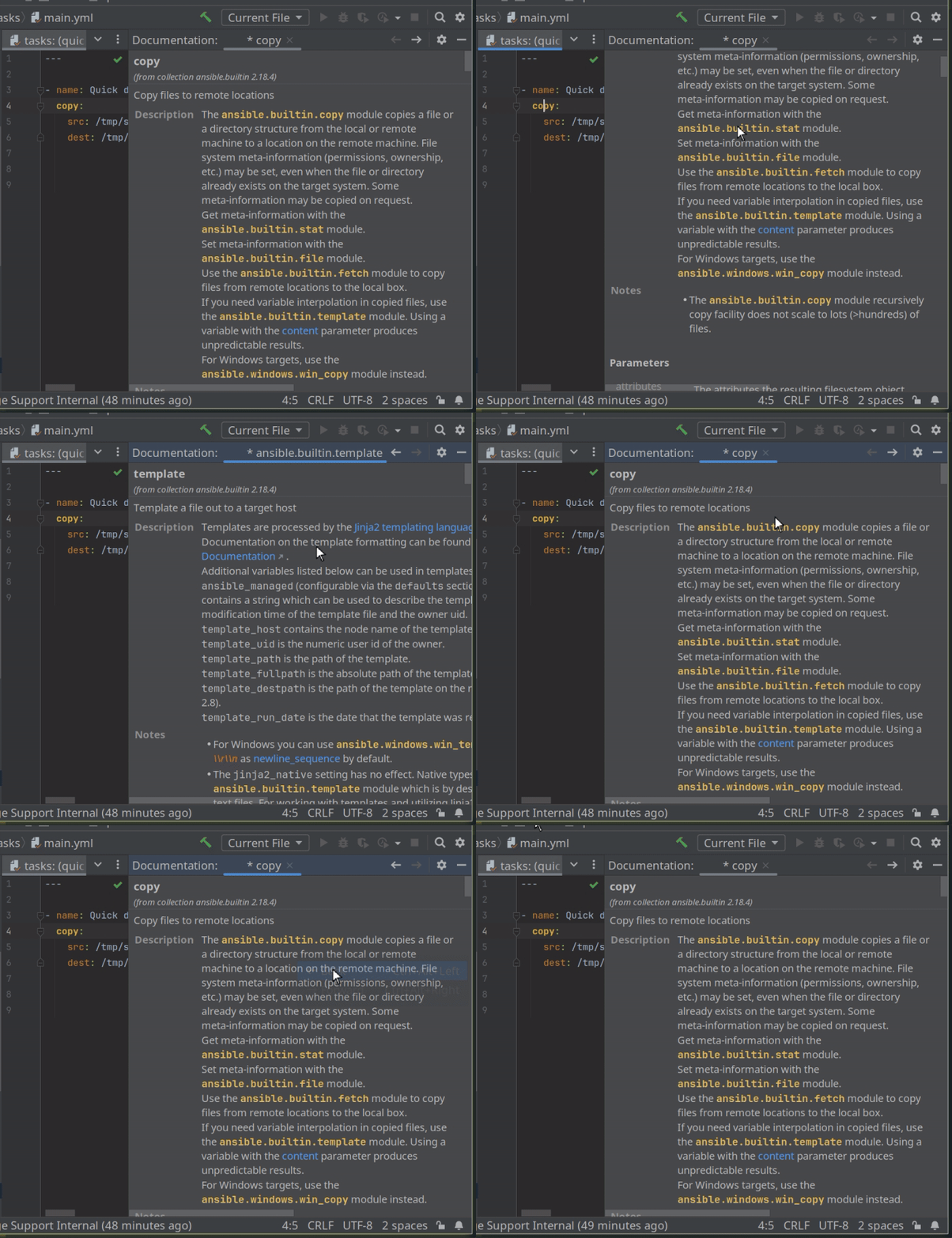
<p>OrchidE Builder Format V2 is completely based on the output of <em>ansible-doc</em>, which makes it much easier to create your own package.
With that, OrchidE provides improved quick documentation:</p>

<ul class="unstyle dash">
  <li>Links to other modules</li>
  <li>‘See also’ documentation is now included in quick documentation</li>
  <li>More detailed information in the <em>deprecated</em> section</li>
</ul>

<p><br /></p>

<p class="col-md-offset-1"><img src="/assets/orchide/news/orchide_quick_documentation_module_links.gif" alt="Navigation between modules in quick documentation" loading="lazy" /></p>

<p><br /></p>

<p><strong>Changes</strong></p>

<ul class="unstyle arrowlist">
  <li><em>Change</em>: OrchidE now recognizes playbooks in role folders.</li>
  <li><em>Bugfix</em>: Fix java.lang.ArrayIndexOutOfBoundsException in OrchideInspectionUndefinedVariableFilterAndTestUtil.getAllBuiltInNames</li>
</ul>

<p><br /></p>

<p><strong>Deprecation</strong></p>

<ul class="wowpanel" style="border-left:7px solid #f06060;">
  <li>Support for IntelliJ platform 2023.2 is <em>deprecated</em> and will end with the launch of the EAP for IntelliJ version 2025.2.</li>
  <li>Support for the OrchidE builder format V1 is <em>deprecated</em>.</li>
</ul>]]></content><author><name></name></author><category term="orchide" /><summary type="html"><![CDATA[OrchidE 2024.1.3 OrchidE 2024.1.3 brings support for the OrchidE Builder format in version 2. OrchidE Builder Format V2 is completely based on the output of ansible-doc, which makes it much easier to create your own package. With that, OrchidE provides improved quick documentation: Links to other modules ‘See also’ documentation is now included in quick documentation More detailed information in the deprecated section Changes Change: OrchidE now recognizes playbooks in role folders. Bugfix: Fix java.lang.ArrayIndexOutOfBoundsException in OrchideInspectionUndefinedVariableFilterAndTestUtil.getAllBuiltInNames Deprecation Support for IntelliJ platform 2023.2 is deprecated and will end with the launch of the EAP for IntelliJ version 2025.2. Support for the OrchidE builder format V1 is deprecated.]]></summary></entry><entry xml:lang="de"><title type="html">OrchidE Version 2024.1.2: Code completion/quick documentation support for the ‘args’ keyword.</title><link href="https://www.orchide.dev/pages/2025/02/16/orchide-2024-1-2" rel="alternate" type="text/html" title="OrchidE Version 2024.1.2: Code completion/quick documentation support for the ‘args’ keyword." /><published>2025-02-16T00:00:00+01:00</published><updated>2025-02-16T00:00:00+01:00</updated><id>https://www.orchide.dev/pages/2025/02/16/orchide-new-version-20241.2-en</id><content type="html" xml:base="https://www.orchide.dev/pages/2025/02/16/orchide-2024-1-2"><![CDATA[<h1 id="orchide-202412">OrchidE 2024.1.2</h1>

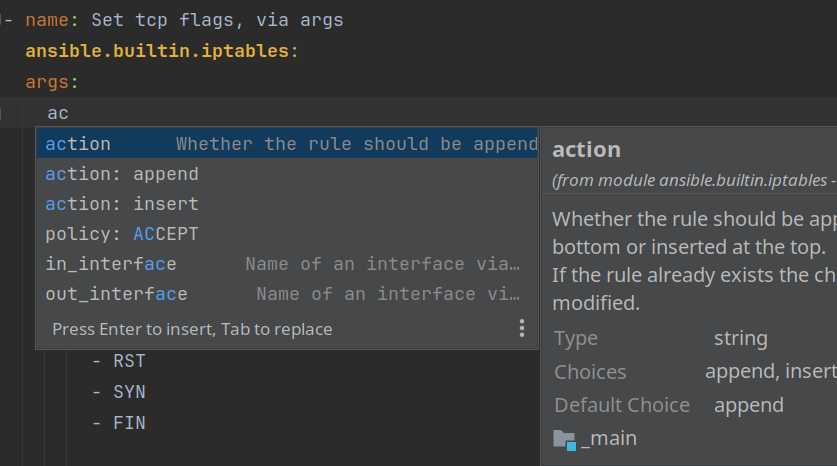
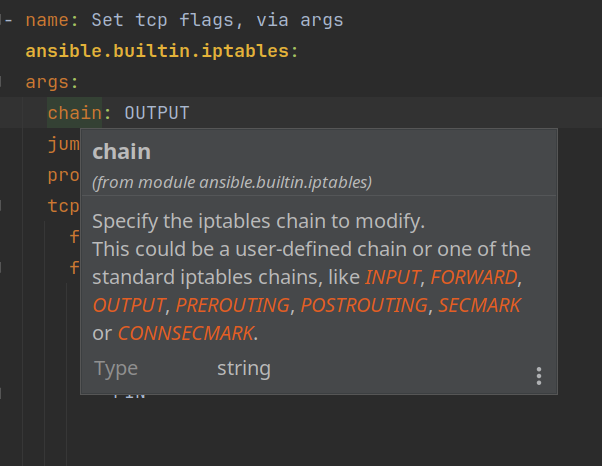
<p>OrchidE 2024.1.2 brings code completion and quick documentation support for the ‘args’ keyword.</p>

<p class="col-md-offset-1"><img src="/assets/orchide/news/orchide_editor_args_keyword_code_completion.webp" alt="Code completion support for args-keyword" loading="lazy" /></p>

<p><br /></p>

<p class="col-md-offset-1"><img src="/assets/orchide/news/orchide_editor_args_keyword_quick_documentation.webp" alt="Quick documentation support for args-keyword" loading="lazy" /></p>

<p><br /></p>

<p><strong>Changes</strong></p>

<ul class="unstyle arrowlist">
  <li><em>Bugfix</em>: Error ‘com.intellij.psi.PsiInvalidElementAccessException: Element: class com.taff.plugin.orchide.psi.element.impl.AnsibleDictEntryImpl’.</li>
  <li><em>Bugfix</em>: IntelliJ 2025.1 EAP 4 compatibility fixes.</li>
</ul>

<p><br /></p>

<p><strong>Deprecation</strong></p>

<p class="wowpanel" style="border-left:7px solid #f06060;">Support for IntelliJ platform 2023.2 is <em>deprecated</em> and will end with the launch of the EAP for IntelliJ version 2025.2.</p>]]></content><author><name></name></author><category term="orchide" /><summary type="html"><![CDATA[OrchidE 2024.1.2 OrchidE 2024.1.2 brings code completion and quick documentation support for the ‘args’ keyword. Changes Bugfix: Error ‘com.intellij.psi.PsiInvalidElementAccessException: Element: class com.taff.plugin.orchide.psi.element.impl.AnsibleDictEntryImpl’. Bugfix: IntelliJ 2025.1 EAP 4 compatibility fixes. Deprecation Support for IntelliJ platform 2023.2 is deprecated and will end with the launch of the EAP for IntelliJ version 2025.2.]]></summary></entry><entry xml:lang="en"><title type="html">OrchidE version 2024.1.1: Jinja2 templating support for shell files.</title><link href="https://www.orchide.dev/pages/2025/01/17/orchide-2024-1-1" rel="alternate" type="text/html" title="OrchidE version 2024.1.1: Jinja2 templating support for shell files." /><published>2025-01-16T00:00:00+01:00</published><updated>2025-01-16T00:00:00+01:00</updated><id>https://www.orchide.dev/pages/2025/01/17/orchide-new-version-20241.1-en</id><content type="html" xml:base="https://www.orchide.dev/pages/2025/01/17/orchide-2024-1-1"><![CDATA[<h1 id="orchide-202411">OrchidE 2024.1.1</h1>

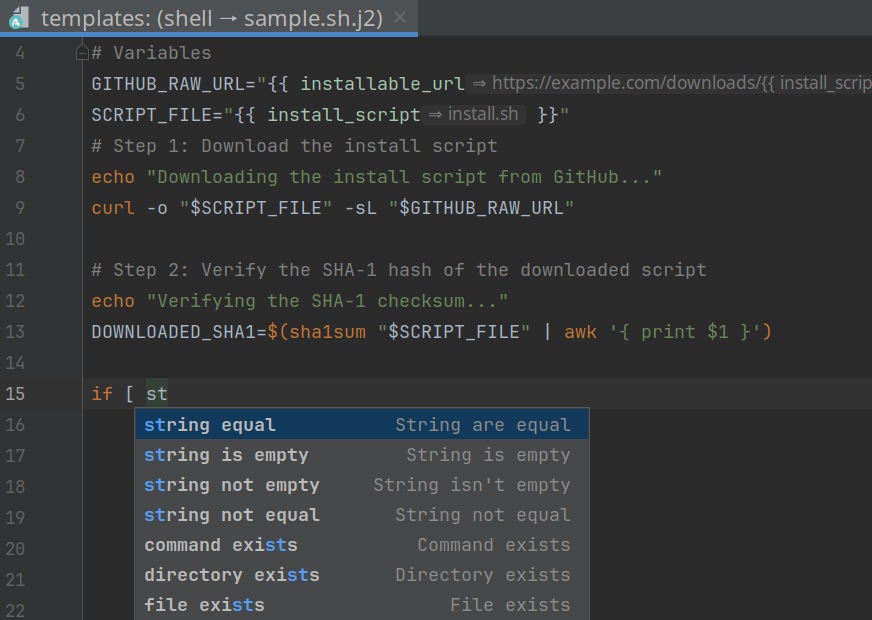
<p>OrchidE 2024.1.1 brings Jinja2 template support for shell files.</p>

<p>Shell scripts used as Ansible templates (.sh.j2) now support the IntelliJ plugin <em>Shell Script</em>.</p>

<p class="col-md-offset-1"><img src="/assets/orchide/news/orchide_editor_template_shell.webp" alt="Jinja2 template support for shell files" loading="lazy" /></p>

<p><br /></p>

<p><strong>Changes</strong></p>

<ul class="unstyle arrowlist">
  <li><em>Change</em>: The <em>Inspection Undefined Variable</em> now considers if/else keywords.</li>
  <li><em>Change</em>: New syntax highlighting for OrchidE’s alias annotation.</li>
  <li><em>Change</em>: When configuring OrchidE, a warning is now displayed if the project folder is used for an inventory. The project folder may only be configured for playbooks.</li>
  <li><em>Change</em>: Improved recognition of inventories in the IntelliJ project folder.</li>
  <li><em>Change</em>: In the configuration for Ansible Folder Mapping, individual playbook and inventory files/patterns for playbooks/inventories can now also be specified in the project folder.</li>
  <li><em>Change</em>: Performance improvement for code completion.</li>
  <li><em>Bugfix</em>: Path specifications for include*-tasks do not support subfolders.</li>
  <li><em>Bugfix</em>: Jinja2 templates for XML files are not recognized.</li>
  <li><em>Bugfix</em>: If Jinja2 templates are incomplete and a tooltip is displayed at the same time, an exception occurs.</li>
</ul>

<p><br /></p>

<p><strong>Deprecation</strong></p>

<p class="wowpanel" style="border-left:7px solid #f06060;">Support for IntelliJ platform 2023.2 is <em>deprecated</em> and will end with the launch of the EAP for IntelliJ version 2025.2.</p>]]></content><author><name></name></author><category term="orchide" /><summary type="html"><![CDATA[OrchidE 2024.1.1 OrchidE 2024.1.1 brings Jinja2 template support for shell files. Shell scripts used as Ansible templates (.sh.j2) now support the IntelliJ plugin Shell Script. Changes Change: The Inspection Undefined Variable now considers if/else keywords. Change: New syntax highlighting for OrchidE’s alias annotation. Change: When configuring OrchidE, a warning is now displayed if the project folder is used for an inventory. The project folder may only be configured for playbooks. Change: Improved recognition of inventories in the IntelliJ project folder. Change: In the configuration for Ansible Folder Mapping, individual playbook and inventory files/patterns for playbooks/inventories can now also be specified in the project folder. Change: Performance improvement for code completion. Bugfix: Path specifications for include*-tasks do not support subfolders. Bugfix: Jinja2 templates for XML files are not recognized. Bugfix: If Jinja2 templates are incomplete and a tooltip is displayed at the same time, an exception occurs. Deprecation Support for IntelliJ platform 2023.2 is deprecated and will end with the launch of the EAP for IntelliJ version 2025.2.]]></summary></entry><entry xml:lang="en"><title type="html">OrchidE version 2024.1.0: New functions for shell module and Ansible test arguments.</title><link href="https://www.orchide.dev/pages/2024/11/28/orchide-2024-1-0" rel="alternate" type="text/html" title="OrchidE version 2024.1.0: New functions for shell module and Ansible test arguments." /><published>2024-11-28T00:00:00+01:00</published><updated>2024-11-28T00:00:00+01:00</updated><id>https://www.orchide.dev/pages/2024/11/28/orchide-new-version-20241.0-en</id><content type="html" xml:base="https://www.orchide.dev/pages/2024/11/28/orchide-2024-1-0"><![CDATA[<h1 id="orchide-202410">OrchidE 2024.1.0</h1>

<p>OrchidE 2024.1.0 brings <em>language injection</em> support for the Ansible <em>shell</em> module, editor functions for arguments of Ansible test functions, 
and an aliasing function for variables to associate the variable with a role argument spec definition.</p>

<p><strong>Language injection for shell module</strong></p>

<p>For script code in the Ansible shell module, it is now possible to edit the code in OrchidE with the corresponding plugin.</p>

<p>The plugins for Shell, PowerShell, and Python are currently supported.</p>

<video width="700" controls="" class="col-md-offset-1">
  <source src="/assets/orchide/news/orchide_editor_language_injection_support.mp4" type="video/mp4" />
</video>

<p><br /></p>

<p>OrchidE can recognize the language by means of an annotation, the keyword <em>executable</em> or a <em>shebang</em> line.</p>

<p>If there is more than one entry, the entry with the highest priority is used:</p>

<ul>
  <li>1) Annotation</li>
  <li>2) Keyword <em>executable</em></li>
  <li>3) Shebang</li>
</ul>

<p><br /></p>

<p><strong>Support for test arguments</strong></p>

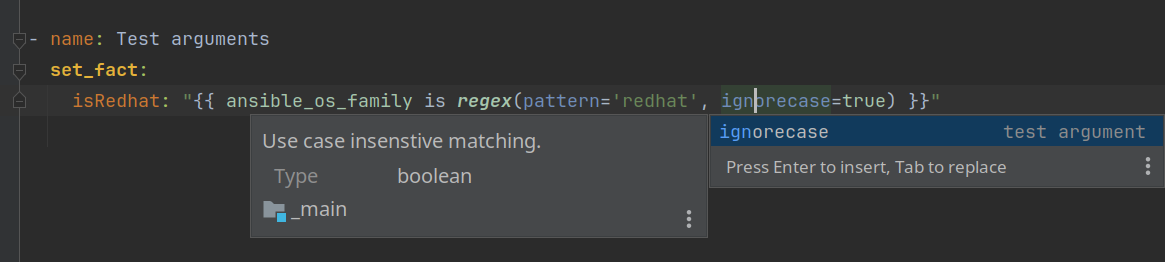
<p>Code completion, syntax highlighting, and quick documentation are now available for Ansible test plugin arguments.</p>

<p class="col-md-offset-1"><img src="/assets/orchide/news/orchide_editor_test_argument_support.webp" alt="Support for argument with Ansible test plugins" loading="lazy" /></p>

<p><br /></p>

<p><strong>Alias for inventory variables</strong></p>

<p>With the alias annotation of OrchidE you get Quick Documentation, Code Completion and Navigation for
Argument-spec variables that are used indirectly.</p>

<video width="700" controls="" class="col-md-offset-1">
  <source src="/assets/orchide/news/orchide_editor_aliases.mp4" type="video/mp4" />
</video>

<p><br /></p>

<p>If you want to install a role on a node several times, you can do this in the playbook, for example:</p>

<pre>
- name: Sample Aliases
  roles:
    - role: service-instance
      vars:
        install_folder: ""

    - role: service-instance
      vars:
        install_folder: ""
</pre>

<p>However, auxiliary variables must now be used to maintain the <em>install_folder</em> variable in the inventory.
To continue using editor functions such as quick documentation, navigation and code completion for
variables from the argument-spec definition, the <em>alias</em> annotation of OrchidE is used.</p>

<p>With the alias annotation, the auxiliary variables can be mapped to the argument spec definition:</p>
<pre>
#@alias::install_folder
alias_sample_instance_1: /opt/service_1
</pre>

<p><br /></p>

<p><strong>Deprecation</strong></p>

<p class="wowpanel" style="border-left:7px solid #f06060;">Support for IntelliJ platform 2023.1 is <em>deprecated</em> and will end with the launch of the EAP for IntelliJ version 2025.1.</p>]]></content><author><name></name></author><category term="orchide" /><summary type="html"><![CDATA[OrchidE 2024.1.0 OrchidE 2024.1.0 brings language injection support for the Ansible shell module, editor functions for arguments of Ansible test functions, and an aliasing function for variables to associate the variable with a role argument spec definition. Language injection for shell module For script code in the Ansible shell module, it is now possible to edit the code in OrchidE with the corresponding plugin. The plugins for Shell, PowerShell, and Python are currently supported. OrchidE can recognize the language by means of an annotation, the keyword executable or a shebang line. If there is more than one entry, the entry with the highest priority is used: 1) Annotation 2) Keyword executable 3) Shebang Support for test arguments Code completion, syntax highlighting, and quick documentation are now available for Ansible test plugin arguments. Alias for inventory variables With the alias annotation of OrchidE you get Quick Documentation, Code Completion and Navigation for Argument-spec variables that are used indirectly. If you want to install a role on a node several times, you can do this in the playbook, for example: - name: Sample Aliases roles: - role: service-instance vars: install_folder: "" - role: service-instance vars: install_folder: "" However, auxiliary variables must now be used to maintain the install_folder variable in the inventory. To continue using editor functions such as quick documentation, navigation and code completion for variables from the argument-spec definition, the alias annotation of OrchidE is used. With the alias annotation, the auxiliary variables can be mapped to the argument spec definition: #@alias::install_folder alias_sample_instance_1: /opt/service_1 Deprecation Support for IntelliJ platform 2023.1 is deprecated and will end with the launch of the EAP for IntelliJ version 2025.1.]]></summary></entry><entry xml:lang="en"><title type="html">OrchidE Version 2023.1.7: New functions and improvements.</title><link href="https://www.orchide.dev/pages/2024/10/06/orchide-2023-1-7" rel="alternate" type="text/html" title="OrchidE Version 2023.1.7: New functions and improvements." /><published>2024-10-06T00:00:00+02:00</published><updated>2024-10-06T00:00:00+02:00</updated><id>https://www.orchide.dev/pages/2024/10/06/orchide-new-version-20231.7-en</id><content type="html" xml:base="https://www.orchide.dev/pages/2024/10/06/orchide-2023-1-7"><![CDATA[<h1 id="orchide-202317">OrchidE 2023.1.7</h1>

<p>OrchidE 2023.1.7 brings some improvements for the configuration of OrchidE and syntax highlighting for Ansible test plugins.</p>

<p><strong>Global setting for code completion of collections</strong></p>

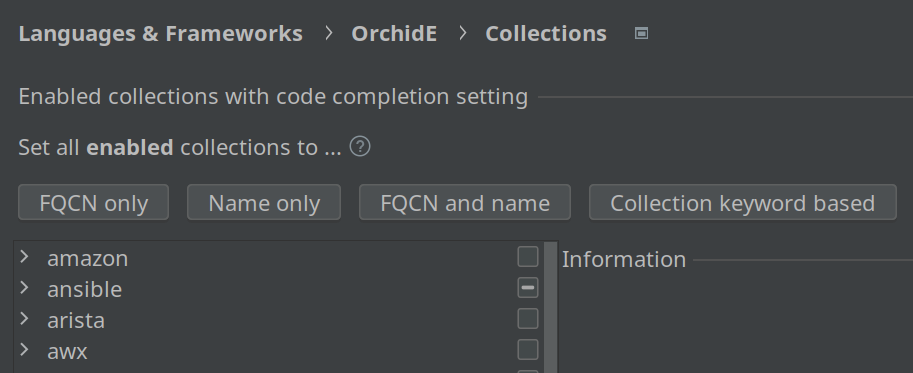
<p>The code completion mode for collections can now be set for all collections at once.</p>

<p>Individual changes can be made subsequently set certain collections differently.</p>

<p class="col-md-offset-1"><img src="/assets/orchide/news/orchide_config_collections_global_settings.webp" alt="Collections configuration for global settings" loading="lazy" /></p>

<p><br /></p>

<p><strong>Global pattern for playbook file names</strong></p>

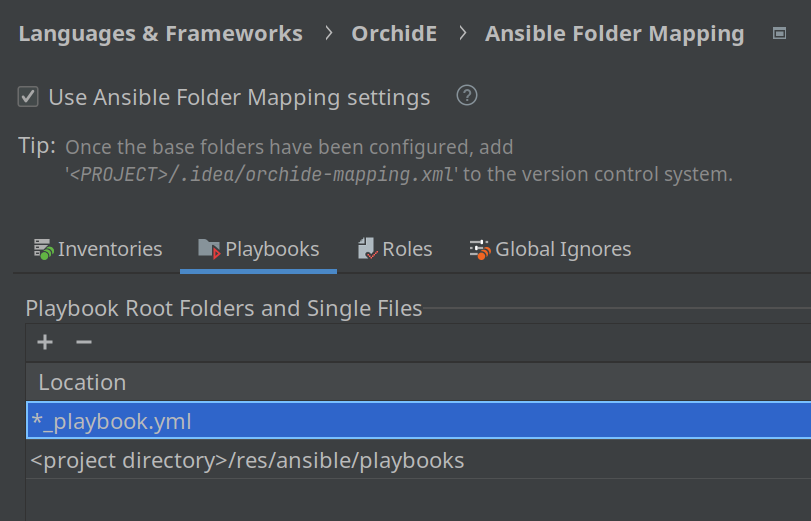
<p>File names or file name patterns can now also be used to recognize playbooks. These patterns are used to search the entire
IntelliJ project for files that match the pattern.</p>

<p>The exact file name can be specified, or alternatively, a pattern with wildcards can be used.</p>

<p class="col-md-offset-1"><img src="/assets/orchide/news/orchide_config_folder_mapping_playbook_file_pattern.webp" alt="Playbook config settings with sample of file name pattern" loading="lazy" /></p>

<p><br /></p>

<p><strong>Syntax highlighting for Ansible test arguments</strong></p>

<p class="col-md-offset-1"><img src="/assets/orchide/news/orchide_editor_test_plugin_argument_highlighting.webp" alt="Syntax Highlighting for Ansible test arguments" loading="lazy" /></p>

<p><br /></p>

<p><strong>Quick Documentation for Ansible Test Plugins</strong></p>

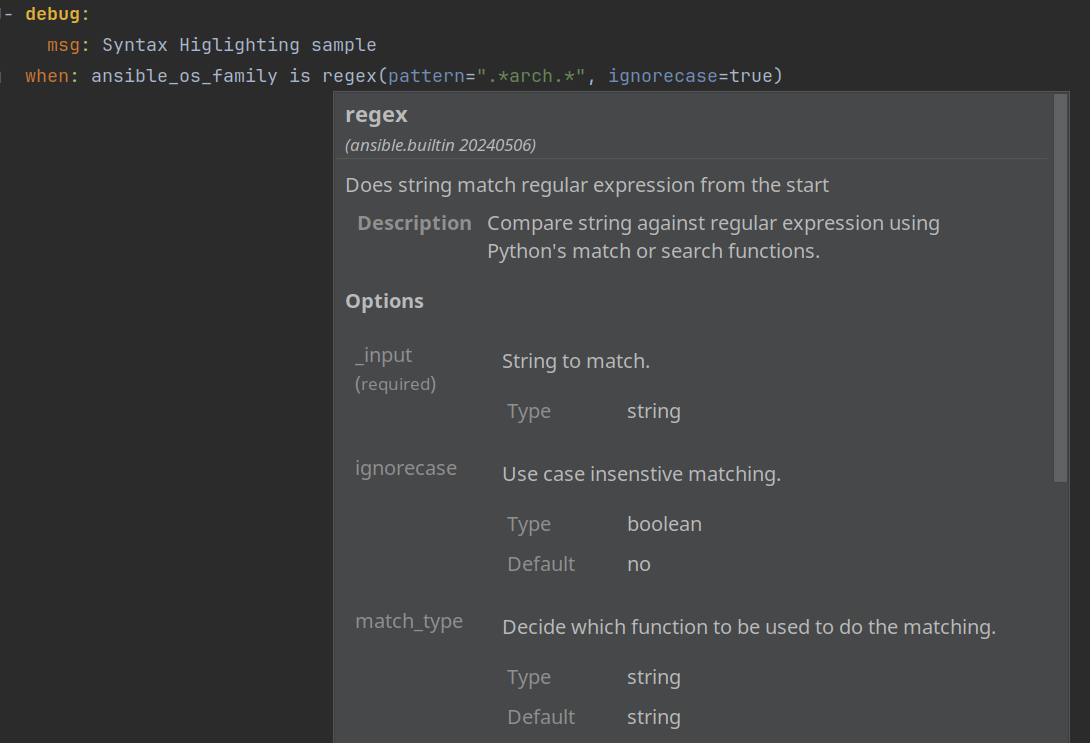
<p>For Ansible test plugins ‘Quick Documentation’ is now supported in the editor with shortcut or mouse-over.</p>

<p class="col-md-offset-1"><img src="/assets/orchide/news/orchide_editor_quick_documentation_test_plugin.webp" alt="Quick documentation for Ansible test plugins" loading="lazy" /></p>

<p><br /></p>

<p><strong>Changes</strong></p>

<ul class="unstyle arrowlist">
  <li><em>Change</em>: Support for inserting closing quotes similar to other IntelliJ editors with some Ansible yaml specific extensions.</li>
  <li><em>Change</em>: Improved support of Ansible test plugins for the ‘Undefined Variable’ inspection.</li>
  <li><em>Change</em>: Some more defaults in ‘Ansible Folder Mapping’ (docker-compose, gitlab, files/*)</li>
  <li><em>Change</em>: Some minor changes for IntelliJ EAP version 2024.3</li>
</ul>

<p><br /></p>

<p><strong>Deprecation</strong></p>

<p class="wowpanel" style="border-left:7px solid #f06060;">Support for IntelliJ platform 2023.1 is <em>deprecated</em> and will end with the launch of the EAP for IntelliJ version 2025.1.</p>]]></content><author><name></name></author><category term="orchide" /><summary type="html"><![CDATA[OrchidE 2023.1.7 OrchidE 2023.1.7 brings some improvements for the configuration of OrchidE and syntax highlighting for Ansible test plugins. Global setting for code completion of collections The code completion mode for collections can now be set for all collections at once. Individual changes can be made subsequently set certain collections differently. Global pattern for playbook file names File names or file name patterns can now also be used to recognize playbooks. These patterns are used to search the entire IntelliJ project for files that match the pattern. The exact file name can be specified, or alternatively, a pattern with wildcards can be used. Syntax highlighting for Ansible test arguments Quick Documentation for Ansible Test Plugins For Ansible test plugins ‘Quick Documentation’ is now supported in the editor with shortcut or mouse-over. Changes Change: Support for inserting closing quotes similar to other IntelliJ editors with some Ansible yaml specific extensions. Change: Improved support of Ansible test plugins for the ‘Undefined Variable’ inspection. Change: Some more defaults in ‘Ansible Folder Mapping’ (docker-compose, gitlab, files/*) Change: Some minor changes for IntelliJ EAP version 2024.3 Deprecation Support for IntelliJ platform 2023.1 is deprecated and will end with the launch of the EAP for IntelliJ version 2025.1.]]></summary></entry></feed>